General
CipherPaths is a free, portable Windows application that combines a password manager and an encrypted file manager. It stores your logins, cards, contacts and files inside a single encrypted vault that lives entirely on your own device.
Most password managers only store credentials, often in the cloud with a subscription. CipherPaths also encrypts real files — documents, photos and PDFs — alongside your passwords, keeps everything completely local, and is free. It can decrypt individual files without unlocking the whole vault, so it stays fast even with thousands of files. No internet connection is required. It can be installed on a USB drive to be portable or (if you choose) stored on your own networked drive such as OneDrive or Google Drive.
Yes. CipherPaths is free to download and use, with no accounts and no monthly subscriptions.
Security & encryption
File contents, file names and metadata are encrypted with AES-256-GCM. Your master password is turned into a key using Argon2id, which unwraps a random vault master key; further keys are derived with HKDF. All cryptography is provided by the open-source OpenSSL library. AES-256 uses a 256-bit cryptographic key. Because there are 2256 possible combinations, it is considered mathematically impossible to brute-force with modern computing power, when used with a strong password. It is also resistant to future quantum threats. GCM (Galois/Counter Mode) also outputs an authentication tag. This tag guarantees that the data hasn't been tampered with or corrupted during transit or storage. Older encryption modes only kept data secret but required a separate mechanism to check if the message was altered. Finally, AES encryption is heavily optimized via hardware on modern CPUs (via AES-NI instructions). So performance is excellent. Argon2id is used to make the master key with the number of interations calibrated to 800ms on the machine creating the vault, with a clamped range of between 3 and 40 interations. Typically this value is around 20 on a modern computer.
For a flow chart showing additional details see this page.
Yes. Both the contents and the names of your files and folders are encrypted. On disk they appear as random text, and file sizes are padded (padmé-padded) so their true length is hidden as well.
No. Your master password is never written to disk. It is only used, in memory, to derive the keys that unlock your vault.
You can recover the vault using the recovery key shown when the vault was created. If you lose both the master password and the recovery key, the data cannot be recovered — there is no backdoor. The data is gone forever. Please print and safely store your recovery key. We do not have a copy of your data and can not recover it. There is no point contacting us to help with recovery if you have lost the credentials.
Storage & privacy
Everything is stored locally in a folder you choose. Nothing is uploaded, and CipherPaths works fully offline. If you want remote access, you can place the vault inside a cloud-drive folder — it stays encrypted there too. Or you can use a USB drive.
Yes. Because the vault is just a folder, you can keep it on a USB stick, network share or a synced cloud folder and open it from different machines. Multiple instances of the app can even share the same vault.
Simply copy the vault folder — it remains encrypted, so backups are safe to store anywhere, including cloud storage. You can also use Export Vault to produce a plaintext copy for migration to another platform (handle that copy carefully, as it is unencrypted). Master password is required for the export.
Installation & usage
No installer is required. Download the ZIP, extract it, and run
CipherPaths.exe. The executable is around 5 MB (including the OpenSSL library, PDF viewwer and video player).
The full GUI app supports Windows 10 and 11 today. The command-line tool additionally runs on Linux (x86_64) — both are free to download. macOS is under consideration.
Images (JPEG and PNG), PDFs and text files can be opened in the built-in viewers. Only a single file is decrypted at a time & the file is decrypted only in memory — no plaintext copy is written to disk. Other file types can be exported when you need them.
Not at all. You can use CipherPaths purely as an encrypted file store, or just to keep a private list of contacts, without ever entering a website credential.
Security and other limitations
Yes. As encryption is done on a file by file basis is it possible to know some meta data about the vault. This includes a file/folder count, directory structure/depth, and the approximate size of large files remain observable on disk. The name-length padding also doesn't totally hide the file name length. File sizes above 4KB can be determined to a multiple of 4KB. File name length can be determined to mulitple of 10 characters.
Random 96-bit nonces are used for every file. Random 96-bit nonces under one AES key hit the birthday bound around 4 billion encryptions (NIST SP 800-38D guidance). If you are creating a vault with more than 10,000,000 files then consider splitting up the vault into multiple vaults to stay well under the safety limit. Likley you will hit the limits of the Windows NTFS file system before this becomes a risk however.
There is no deniability. The files in CipherPaths are obviously encrypted and easy to locate on your hard drive. So this is not the best solution if you need to hide the existance of encrypted files.
The folder record type is revealed in the folder name for the root folder. So it is possible to know if a folder in the root folder is a contact or a credential without decryption.
No attempt is made to prevent the deletion or replacement of files in the vault. So someone with access to your computer could delete all the files in the vault (or replace them with other encrypted files, or roll them back to some earlier version of the same encrypted file). This can be useful for moving, backing up and restoring the vault, but depending on your threat model, this can also be a weakness.
If you import a file into the vault, then the source file remains on disk and with SSDs it can be hard to wipe the unencrypted source file completely (due to SSD features such as wear leveling).
The app cannot fully prevent plaintext exposure when the vault is unlocked, through OS-level mechanisms such as clipboard, pagefile, crash dumps, hibernation, screen capture, remote desktop monoitoring, keyboard logging or third-party spyware tools. If you suspect your machine has been compromised or remotely monitored, move the vault to a clean machine before unlocking it.
Random 96-bit nonces are used for every file. Random 96-bit nonces under one AES key hit the birthday bound around 4 billion encryptions (NIST SP 800-38D guidance). If you are creating a vault with more than 10,000,000 files then consider splitting up the vault into multiple vaults to stay well under the safety limit. Likley you will hit the limits of the Windows NTFS file system before this becomes a risk however.
There is no deniability. The files in CipherPaths are obviously encrypted and easy to locate on your hard drive. So this is not the best solution if you need to hide the existance of encrypted files.
The folder record type is revealed in the folder name for the root folder. So it is possible to know if a folder in the root folder is a contact or a credential without decryption.
No attempt is made to prevent the deletion or replacement of files in the vault. So someone with access to your computer could delete all the files in the vault (or replace them with other encrypted files, or roll them back to some earlier version of the same encrypted file). This can be useful for moving, backing up and restoring the vault, but depending on your threat model, this can also be a weakness.
If you import a file into the vault, then the source file remains on disk and with SSDs it can be hard to wipe the unencrypted source file completely (due to SSD features such as wear leveling).
The app cannot fully prevent plaintext exposure when the vault is unlocked, through OS-level mechanisms such as clipboard, pagefile, crash dumps, hibernation, screen capture, remote desktop monoitoring, keyboard logging or third-party spyware tools. If you suspect your machine has been compromised or remotely monitored, move the vault to a clean machine before unlocking it.
CipherPaths is based on the open source OpenSSL encryption library. To a large extent it is a graphical user interface sitting on top of OpenSSL. OpenSSL is routinely and rigorously subjected to security audits by cybersecurity firms and automated analysis tools over it's near 30 year history. The library is widely considered to have a highly hardened codebase, though new vulnerabilities are occasionally uncovered. We are currently using OpenSSL 3.6.2.
Good (unpredictable) random number generation is needed when creating and securing keys.
CipherPaths uses the OpenSSL RAND_bytes function. Which in turn uses hardware entropy sources such as the
Intel RDRAND instuctions. These CPU hardware features became commonly available in PCs around 2015.
If you are using older hardware, the generation of random numbers will be slower, but still provide an acceptable
level of security.
Encryption is done on a file by file basis. Both the file name and the file content are encrypted. The encryption process increases the length of the file and folder names. So if you are importing files or folder with long file names, the length of the encrypted file (or folder) name might be longer that what is supported by Windows. In this case you might need to shorten the file name. Up to 120 characeters per file name should be fine however. The exact limit depends on the file system in use. The same problem can be encountered with very deep nested folders. A total file path length limit might be enountered (folder names + file name). See also issues with OneDrive below.
The NTFS File System limit is 32767 characters total for a full path, but 255 per folder or file name in the path.
The NTFS File System limit is 32767 characters total for a full path, but 255 per folder or file name in the path.
If you choose to store your vault on OneDrive, then you might encounter errors with path names being too long for OneDrive. The OneDrive limits the complete path to be just 400 chracters. This includes the path on the local OneDrive root folder, which often is also often fairly long. Something like, C:\Users\username\OneDrive - MyCompanyname Pty Ltd\
In practice this limits the paths in the vault to around 350 characters on OneDrive. Long paths will create an error like this.
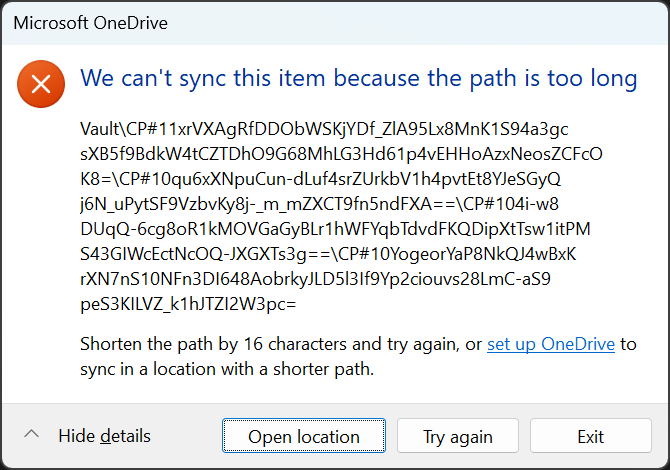
Solutions for this include:
In practice this limits the paths in the vault to around 350 characters on OneDrive. Long paths will create an error like this.
Solutions for this include:
- Moving the OneDrive root folder to a less deep location. e.g. in your C:\ root folder
- Shorten path or folder names in the vault using the file rename option
- Avoid having so many nested folders
- Turn off Padme file name padding in the config window (for existing files & folders you'll also need a rename step for the reduced padding to take effect)
- Use a different cloud storage service
Who developed Cipherpaths
CipherPaths was developed by CoogeeCode Pty Ltd. We have been developing Windows utilities for 40 years (and on DOS prior to Windows being available). Development was done in Sydney, Australia. On the subject of AI, up until late 2025 AI could not be trusted to write reliable code in our opinion and it wasn't used. From mid 2026 however AI is now a useful tool and can produce boiler plate code at a level comparable to an engineer with several years of experience. There are still bugs, but human code has bugs as well. So we are now making limited use of AI with an experienced Windows C++ developer in the loop reviewing the output. We find it especially good for mundane tasks like documentation. As noted above however the critical encryption code is based on the open source OpenSSL library however, which was created long before AI arrived.
Still have a question? Head to the About page to get in touch.